
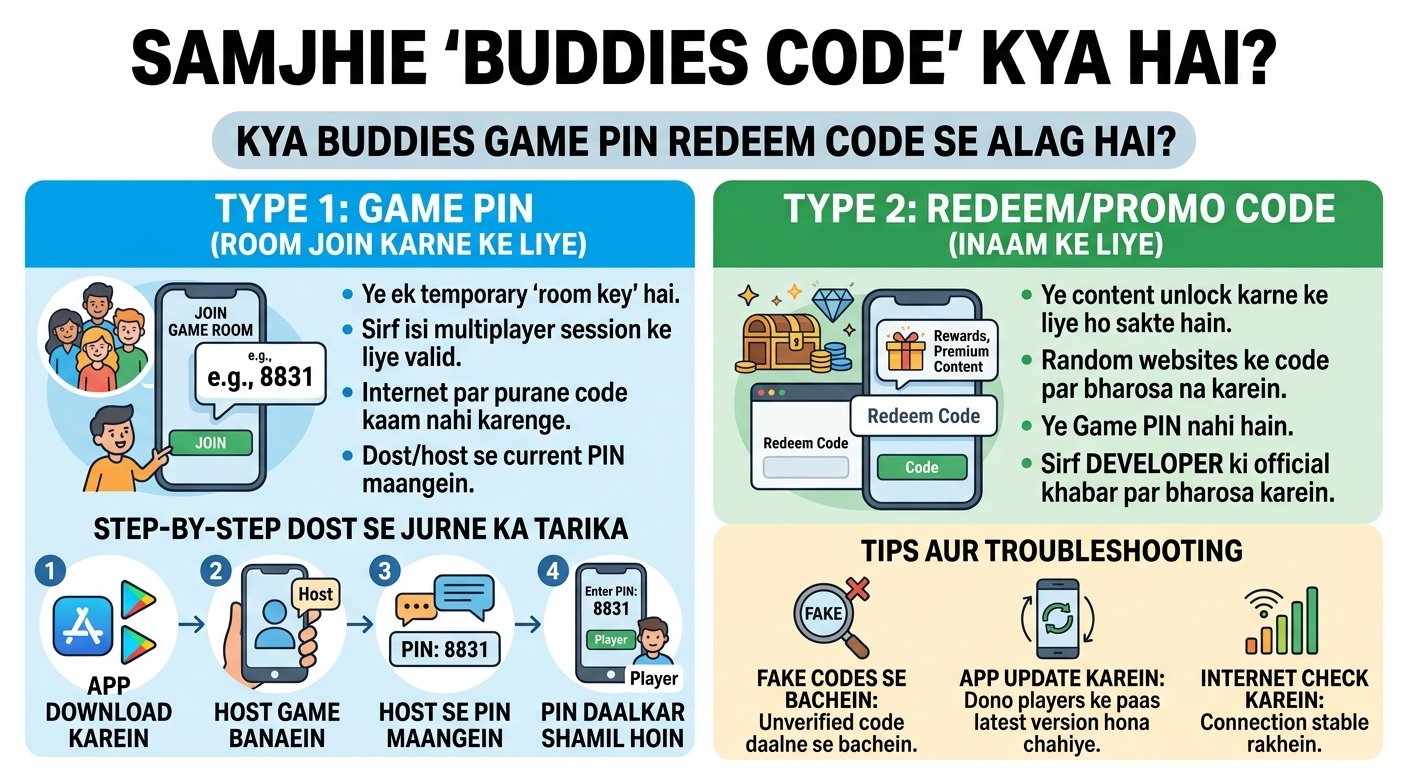
If you are searching for a Buddies code, you probably want the number or code that lets you join a friend’s game. In Buddies: Party & Friends Game, that code is generally a game PIN created when someone starts a room. The official app listings explain that one player creates the game and invites the others using the game PIN.
There is an important distinction, though: a Buddies game PIN is not necessarily the same thing as a redeem or promo code. The official listings describe the PIN as a multiplayer joining method, while current third-party websites sometimes publish unrelated strings as supposed “Buddies codes.”
Quick Answer: To join a Buddies game, install the official app, have the host create a game room, and enter the game PIN they provide. If you are looking for a free redeem or promo code, verify that the code comes from Buddies Games Inc. before using it.
What Is a Buddies Code?
The phrase “Buddies code” can mean two different things depending on what you are trying to do.
1. A Buddies game PIN
This is the code you use to join a multiplayer game created by another player.
The official description says that one player creates the game and invites friends using a game PIN. Everyone then joins the same room and plays together.
Think of it like a temporary room key:
- One player creates the game.
- Buddies generates or displays the game PIN.
- The host shares that PIN with friends.
- Other players use it to enter the room.
- Everyone plays in the same multiplayer session.
The exact PIN changes from game to game, so there is not one universal “Buddies code” that everyone can use.
2. A Buddies redeem or promo code
This is different.
A redeem code would normally unlock something such as premium content, a special reward, or another in-app benefit. Some third-party websites currently publish lists of alleged Buddies codes, but those lists are not the same as an official Buddies Games Inc. code list.
The official App Store and Google Play descriptions currently focus on the game’s room/PIN system, content packs, subscriptions, and in-app purchases rather than documenting a general public promo-code system.
That distinction matters if you are trying to avoid wasting time on expired, fabricated, or unrelated codes.
How to Get a Buddies Game Code
If your goal is to join a friend’s Buddies game, you do not need to search the internet for a permanent code.
Follow these steps.
Step 1: Download Buddies
Start by installing the official Buddies app.
The game is published by Buddies Games Inc. and is available through the major mobile app stores. The iOS listing identifies it as Buddies: Party & Friends Game, while the Android listing uses the name Buddies: Ultimate Party Game.
Use the official store listing rather than an APK or third-party download page.
Step 2: Ask a Friend to Create a Game
Someone in your group needs to act as the host.
That person opens Buddies and creates a multiplayer game or room. The official description explains that one player creates the game and invites the other participants using a game PIN.
If you are trying to join an existing session, ask the host:
“What is the Buddies game PIN?”
That is usually more useful than searching for a generic “Buddies code.”
Step 3: Get the Game PIN
The host should provide the PIN shown by the game.
Because the PIN is connected to a particular game room, you should not expect an old PIN found in a video, forum post, or website to work for your current session.
A useful rule is:
Your friend’s current game PIN matters; an old Buddies code from the internet usually does not.
Step 4: Enter the PIN
Open the joining option in Buddies and enter the PIN supplied by the host.
Make sure you enter the digits exactly as displayed. If the game rejects the PIN, ask the host to confirm that the room is still active and that you have the latest code.
Step 5: Wait for the Host to Start
Once you have joined the room, you should appear with the other participants.
The game is built around multiplayer interaction, including questions, activities, challenges, categories, and different game settings. The current store description says Buddies offers thousands of questions and activities, with settings such as category mixing, question count, timers, anonymous mode, and points-based victory.
Is There a Universal Buddies Code?
No universal game PIN exists.
A Buddies PIN is associated with a particular multiplayer room. That means a code your friend gives you today is not necessarily a code you can use tomorrow.
This is one of the biggest reasons searches for “Buddies code” can be confusing.
If someone publishes a string online and calls it a “Buddies code,” first determine what type of code it is:
| Type of code | What it does | Where it comes from |
|---|---|---|
| Game PIN | Lets you join a multiplayer room | Created/displayed for the game session |
| Redeem code | May unlock a reward if officially supported | Developer or authorized promotion |
| Promo code | May provide a promotional benefit | Official campaign or partner |
| Referral/friend code | May connect accounts or users | App-specific feature |
| Random code from a website | Unclear | Third-party source |
This simple distinction can save you from entering random codes that have nothing to do with the actual game.
Does Buddies Have Redeem Codes?
This is where you should be cautious.
Current third-party search results contain pages claiming to provide Buddies: Party & Friends Game codes, sometimes displaying long alphanumeric strings. However, the official store listings we found do not establish those strings as an official, universal redeem-code system.
For that reason, it would be misleading to present an arbitrary third-party code as a confirmed working Buddies promo code.
Instead, check these sources first:
- The Buddies app itself
- Official Buddies Games Inc. announcements
- The game’s official support channels
- The official Apple App Store or Google Play listing
- A promotion directly linked from the developer
Google Play identifies Buddies Games Inc. as the developer and provides the developer’s support email, while the listing also identifies the game’s multiplayer PIN functionality.
How to Troubleshoot a Buddies Code
If your friend’s Buddies PIN is not working, try these checks.
Check 1: Confirm the PIN
Ask the host to read the PIN again or send you a screenshot.
A single incorrect digit can prevent you from joining the correct room.
Check 2: Make Sure You Are Joining the Same Game
A PIN belongs to a particular game session.
If the host has accidentally created a new room, the previous PIN may no longer be the one you need.
Check 3: Update the App
Check the App Store or Google Play for an available Buddies update.
This is particularly relevant because the developer continues to release updates. The iOS listing shows multiple 2026 updates, including new questions and ongoing bug fixes.
Check 4: Restart the App
Close Buddies completely and reopen it.
Then ask the host for the current PIN again and attempt to join the new session.
Check 5: Check Your Connection
If the PIN appears correct but the game does not connect, test your internet connection and try again.
For persistent technical problems, use the developer’s official support route rather than downloading an unofficial version of the app. Google Play lists help@buddies.fun as the support email for Buddies Games Inc.
What Can You Do in Buddies?
Understanding the game itself makes the purpose of the Buddies PIN much clearer.
Buddies is a social multiplayer party game built around questions, activities, challenges, and group interaction. The current iOS listing says it includes more than 7,000 questions, activities, and group challenges, along with customizable settings and multiple categories.
Depending on the version and available content, players can encounter categories and settings designed for groups such as:
- Friends
- Family
- Colleagues
- Couples
- Party groups
- Travel and entertainment
- More specialized or mature categories
The free version has a limited Starter Pack, while paid options unlock additional categories, content, and settings.
That means the Buddies code/PIN is primarily a gateway into the multiplayer session, rather than a cheat code or permanent reward code.
Buddies Code vs. Other Party-Game Codes
It is easy to confuse Buddies with games that use permanent invitation or redemption codes.
Here is the practical difference:
Buddies game PIN
Used to join a particular multiplayer session.
Promotional code
Used by some games and apps to provide discounts, bonuses, or digital rewards.
Invitation code
Usually associated with an account, referral system, or friend connection.
Room code
Similar to a game PIN and generally used to connect multiple players to the same session.
When someone says “send me the Buddies code,” the safest interpretation is usually:
They want the PIN for the Buddies game room you are hosting.
Are Buddies Codes Free?
Joining a multiplayer game with a game PIN is part of the game’s room-based multiplayer experience.
However, some content inside Buddies is paid. The official listings show in-app purchases and subscriptions for additional content and features.
So do not assume that every “free Buddies code” advertised online unlocks paid content.
If a website asks you to:
- Enter your Apple ID password
- Install an unknown configuration profile
- Download an unofficial APK
- Complete suspicious surveys
- Provide payment information to “generate” a code
- Give away account credentials
stop and verify the offer through an official source first.
Frequently Asked Questions
What is the code for Buddies?
If you mean the code used to join a Buddies multiplayer game, it is the game PIN supplied by the person who created the room. There is no single permanent PIN for every Buddies game.
How do you join a Buddies game with a code?
Install the official Buddies app, have your friend create a game, obtain the current game PIN from the host, and enter that PIN through the game’s joining flow. The official description specifically identifies the game PIN as the method for inviting other players.
Where do I enter a Buddies redeem code?
The official listings reviewed for this article do not document a general public redeem-code system comparable to the promo-code systems used by some other games. If you have a promotional code, verify the instructions from the source that issued it before entering it.
Is there a free Buddies promo code?
Third-party websites currently publish alleged Buddies codes, but the official Buddies Games Inc. listings do not confirm those published strings as universal promotional codes. Treat such lists as unverified unless the developer or an authorized promotion confirms them.
How do you create a Buddies game room?
Open Buddies and start a multiplayer game. The host can then invite the other players using the game PIN. The official store description confirms this room-and-PIN multiplayer model.
Final Takeaway
The phrase “Buddies code” can be misleading because it may refer to a Buddies game PIN rather than a permanent redeem or promo code.
If you simply want to play with friends, the solution is straightforward: create or join a Buddies room and use the current game PIN supplied by the host. Do not rely on an old code copied from a random website.
If you are specifically looking for a Buddies redeem code or promotional reward, verify it through Buddies Games Inc. or an authorized promotion before using it. The current official listings establish the game PIN system, while the third-party code lists found in search results do not provide the same level of verification.
